Building a media library is not a trivial effort.
At least not if you want to do it well. I don’t currently have a NAS, much as I’d like to have one, and hard drive prices are making that painful right now, but I can at least have my shit organized and know what my tools are.
Because I’m primarily going to listen on my desktop and refurbished iPod, there’s gonna be some specialty software in here.
Local library management and playback
Rhythmbox is my choice for this - it’s straightforward and lets me edit file metadata and organizes my music pretty nicely. On top of that, it has internet radio, and is how I manage my podcasts - it downloads them automatically to the appropriate folder, so I can transfer them to my iPod pretty easily.
For playback purposes, I use qmmp, because of Winamp nostalgia. I mean seriously, look at the skins!!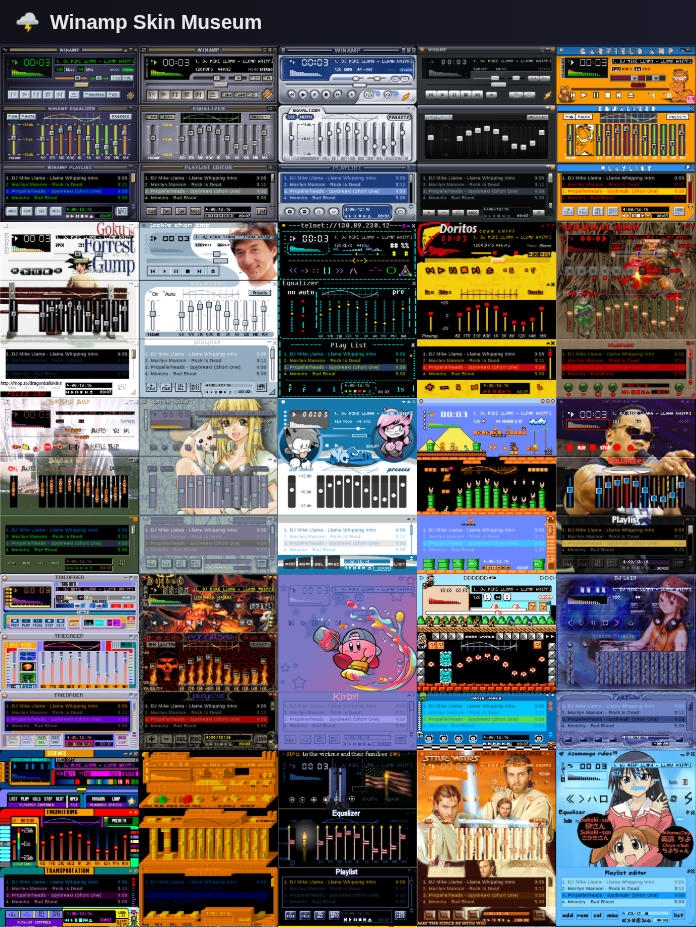
Putting things on my iPod
Rhythmbox can handle iPod import stuff, but I don’t use the standard iPod OS, so I use Scrobbox. I don’t give a damn about scrobbling, but the fact that it natively handles Rockbox stuff is what I really care about, plus you can customize import/export settings, so I’ve got a profile for backing the whole thing up and for putting only new stuff on. TIDAL downloader is also a really nice feature.
Audiobooks
Libro.fm is how I get audiobooks for the most part, except from my old Audible library. I used Libation to sign in, download the whole library, and strip all the DRM out of it, plus get PDFs of the books that came with them!
To make it easier for me to deal with on Rockbox, I split the chapters into separate files using fre:ac. It’s also the software I use to rip CDs, but Rhythmbox can do that just as well.
I hear there are also sites and local applications you can use to download music right from YouTube, but you’ll have to look into that yourself.
Happy listening!